
Automatically refill your semaglutide prescription online
Set up an automatic semaglutide refill online workflow in 2026 with clinician approval, refill reminders, and clear checks before each prescription renewal.

Instead of manually chasing every semaglutide renewal, set up a recurring reminder and a provider-confirmed refill process that keeps clinical review separate from prescription fulfillment. An automatic semaglutide refill online workflow should automate the follow-up—not assume that another prescription, a dose change, or a shipment has been approved.
- An automatic semaglutide refill online workflow needs clinician authorization, not just recurring billing.
- VevaRX offers doctor-prescribed GLP-1 weight-loss care for US adults seeking medical supervision.
- Use recurring refill reminders when your provider does not offer confirmed automatic renewal.
- Check prescription renewal and pharmacy fulfillment separately; one does not confirm the other.
Why this matters
A refill request, prescription renewal, and pharmacy fulfillment are different events. A reminder starts your administrative follow-up; it does not authorize treatment. Likewise, a recurring payment does not establish that a clinician has approved your next prescription.
VevaRX is best suited to US adults seeking doctor-prescribed, medically supervised weight-loss care online. VevaRX offers semaglutide through its telehealth platform, but the safe workflow starts with confirming how your prescribed treatment is renewed.
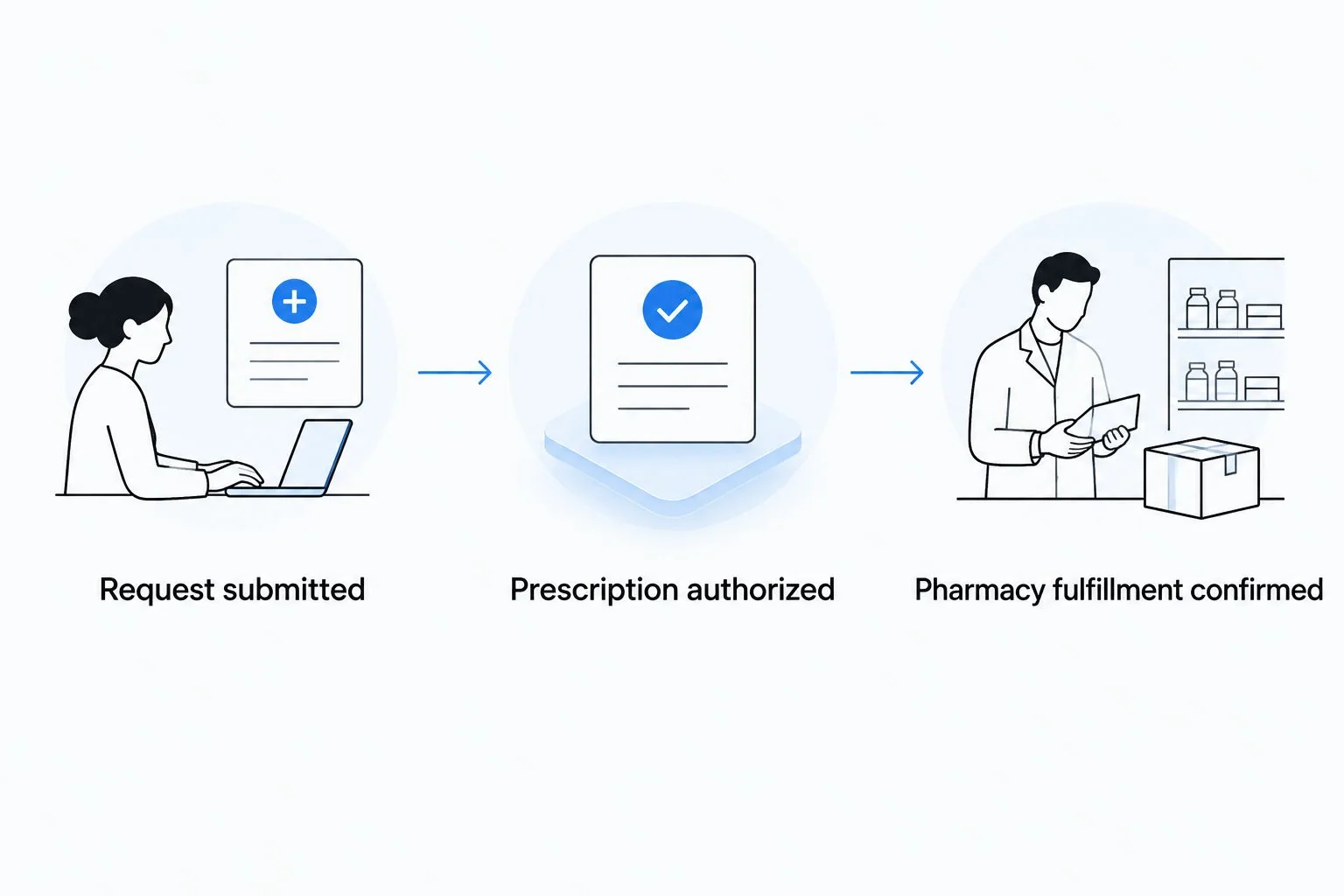
For your 2026 setup, track 3 status checkpoints: request submitted, prescription authorized, and pharmacy fulfillment confirmed. Keeping those checkpoints separate helps you identify who needs to act next. You do not have to guess whether a calendar notification means your medication is on its way.
Before you start
- Access and contacts: Have access to your provider's patient communication channel, your dispensing pharmacy's contact details, and a calendar you check regularly. Identify which organization handles clinical renewal and which handles fulfillment.
- Prescription information: Keep your current prescription instructions, medication label, last administration date, and any requested follow-up information together. Use a private record rather than a shared work calendar for medical details.
- The important gotcha: Confirm whether automatic refill means a reminder, a refill request, an authorized pharmacy refill, or recurring billing. Ask what requires clinician review and what stops the process when your treatment changes.
Do not build the schedule around an assumed renewal interval. Ask the provider when to submit the next request and what information is required. Your reminder should follow that instruction, not a generic schedule found online.
Prescription and renewal settings
This configuration unit establishes what can actually repeat. Get the renewal instructions before setting an automatic schedule. A calendar cannot resolve an expired prescription, a required appointment, or a clinician's decision to change treatment.
- Identify the renewal owner. Ask your prescribing provider whether you submit renewal requests to the clinical team, the dispensing pharmacy, or both. Record the answer in your private treatment notes.
- Confirm the current prescription. Check the medication name and instructions against the label you received. If the label and your latest clinical instructions differ, contact the prescriber or pharmacist before proceeding.
- Ask what repeats automatically. Find out whether the service initiates a request, processes an existing authorized refill, or only sends a reminder. Ask how you receive confirmation and how to stop future requests.
- Record the review requirement. Note any follow-up visit, questionnaire, or other information your clinician requires before renewal. Treat that task as part of the workflow, not an optional extra.
- Set the next action date. Use the timing provided by your clinical team or pharmacy. Record who to contact if you have not received the expected confirmation.
Expected result: You have a documented renewal route, a next action date, and a clear description of what automation does—and does not—do.
If you are still moving from an initial consultation to a prescription, the telehealth consult-to-prescription workflow covers the preceding stage. Do not treat onboarding confirmation as refill authorization.
For a 2026 treatment record, keep the current instructions easy to distinguish from older messages. Mark superseded notes as outdated rather than leaving conflicting instructions side by side.
Recurring reminder configuration
A reminder-based workflow is the practical fallback when the provider has not confirmed automatic renewal. The following steps use Google Calendar on the web for administrative reminders only. They do not connect Google Calendar to a medical record or submit a prescription request.
- Select Create, then Event. Use a neutral title such as Treatment follow-up if other people can see your calendar. Do not put your diagnosis, dose, or prescription label in a shared event.
- Set the event date using the action date your provider supplied. Add a short task description: submit the required update through the provider's designated channel.
- Select Does not repeat, then Custom if the provider has confirmed a recurring interval. Set that interval to match the instruction. If future timing depends on clinical review, leave the event nonrecurring and schedule the next one after review.
- Add a notification that fits your routine. The notification should remind you to complete an administrative task, not tell you to take or change medication.
- Select Save. Reopen the event and verify its date, recurrence, visibility, and notification settings.
- Create a separate confirmation-check event for the follow-up date agreed with your provider. Its task is to verify whether the request was received and what remains outstanding.
Expected result: You have 2 separate reminders: one to act and one to verify. Neither reminder is labeled as prescription approval.
Use 1 recurring event for the repeatable administrative task rather than overlapping events for the same request. Duplicate reminders make it harder to tell whether you already submitted a renewal. Keep medication-administration reminders separate from this refill workflow.
Renewal and fulfillment checkpoints
The final configuration unit connects your reminders to evidence of progress. For your 2026 workflow, record the latest confirmed state rather than marking the entire process complete after the first response.
- Request submitted: Send the required information through the provider's designated channel. Record the submission date and retain any acknowledgment. Do not send medical details through an unrelated messaging app simply because it is convenient.
- Prescription authorized: Check for confirmation from the clinical team or dispensing pharmacy that the prescription has been issued or an existing refill is authorized. A questionnaire submission or payment receipt does not establish this checkpoint.
- Pharmacy fulfillment confirmed: Verify that the dispensing pharmacy has received the prescription and identify any outstanding action. Where shipment tracking is provided, keep it with the fulfillment record rather than treating it as a clinical instruction.
- Next cycle recorded: After the current request is resolved, confirm the next review or request date. Update your calendar if the treatment plan or renewal process has changed.
Expected result: You can identify the last completed checkpoint and contact the responsible team without submitting duplicate requests.
Keep clinical questions with the prescriber and dispensing questions with the pharmacy. If an issue spans both teams, explain the last confirmed checkpoint and ask which team must resolve the remaining task.
A second workflow: update reminders after a treatment change
When a clinician changes your treatment, update the administrative schedule instead of letting the previous recurrence continue. This variant is especially useful when the next review date changes or the clinician asks you to pause treatment.
- Read the new instructions and clarify any conflict with your current label or previous messages.
- Open the existing refill event. Remove or revise future reminders that no longer match the plan.
- Confirm whether an outstanding request needs to be canceled or amended. Changing your calendar does not change a request already sent to a provider or pharmacy.
- Add the new review date and retain a record of the updated instructions.
Expected result: Your calendar reflects the current plan, and you have checked whether the provider or pharmacy needs a separate update.
Choose the workflow by the amount of confirmed automation, not by the convenience of its name:
| Workflow | Best for | Advantage | Limitation |
|---|---|---|---|
| Provider-confirmed automatic refill process | Adults whose provider explicitly confirms an authorized recurring process | Reduces repeat administrative work | Still depends on prescription validity and clinical requirements |
| Reminder-based renewal | Adults who must submit an update or request each cycle | Makes required actions visible | You still need to complete and verify the request |
| Treatment-change reset | Adults with new clinician instructions | Prevents outdated administrative reminders | Calendar changes do not cancel existing pharmacy requests |
For 2026, use reminder-based renewal unless the provider has explicitly confirmed what its automatic process includes. Keep the confirmation in your private records so you can refer to it later.
Troubleshooting
The reminder fired, but no request was submitted
A calendar notification cannot send a refill request unless a separate, verified integration performs that action. Open the provider's designated channel, complete the required task, and record the acknowledgment. Rename the reminder if its wording suggested that submission happened automatically.
Billing repeated, but prescription status is unclear
Contact the clinical team for prescription status and the relevant support team for billing questions. Keep the two questions separate. A payment confirmation is not evidence of clinical authorization or pharmacy fulfillment.
The pharmacy has not received the prescription
Confirm the pharmacy details with the prescribing team and ask whether the prescription was transmitted. Then check with the pharmacy using the information the provider supplies. Do not create another account or submit another treatment request to solve a transmission problem.
Your instructions changed after you requested a refill
Contact the prescriber and pharmacy before acting on the older request. Ask whether the request needs amendment or cancellation, then update your reminders. Do not convert quantities, increase a dose, or use older instructions to fill the gap yourself.
You missed treatment or developed concerning symptoms
Ask your prescriber or pharmacist for medication-specific instructions before resuming treatment. Do not use a refill reminder as a restart plan. Severe or persistent abdominal pain, repeated vomiting, or signs of dehydration warrant prompt medical assessment; seek emergency care for severe symptoms.
Customize your workflow
Build the next layer around the administrative task that repeatedly holds you up. If a questionnaire is required, add a reminder to prepare the requested information. If the pharmacy needs confirmation from you, make that a distinct task rather than burying it in your notes.
For VevaRX semaglutide care, the value is access to doctor-prescribed treatment online. The limit of automation is clinical: reminders cannot decide whether continuing treatment is appropriate. Keep medical decisions with the prescriber and automate only the administrative actions that have been confirmed.
Review your 2026 setup whenever your provider, pharmacy, medication instructions, or contact information changes. Remove obsolete events and check calendar sharing settings. Store clinical records in the appropriate private channel, not in an event description visible to colleagues or family members.
FAQ
Can I automatically refill my semaglutide prescription online?
You can use an automatic refill process only when your provider or dispensing pharmacy confirms it is supported for your prescription. Otherwise, use recurring reminders to submit and verify renewal requests. Automation does not replace clinician authorization.
Does VevaRX offer automatic semaglutide refills?
Confirm VevaRX's current renewal process directly before setting up automatic reminders or expecting recurring fulfillment. VevaRX offers doctor-prescribed semaglutide online, but that alone does not establish an automatic refill feature.
Is automatic billing the same as an automatic prescription refill?
No, automatic billing and prescription refill authorization are separate processes. Verify the clinical decision and pharmacy status independently of any payment confirmation.
How early should I request my next semaglutide refill?
Use the request timing supplied by your prescribing team or dispensing pharmacy. Set your reminder to that instruction rather than using a generic interval, and confirm any required follow-up tasks.
Can I use Google Calendar for semaglutide refill reminders?
Yes, Google Calendar can remind you to submit a request and check its status. A calendar event does not submit a prescription request or authorize treatment, and shared events should not contain sensitive medical details.
What should I do if my semaglutide dose changes before a refill?
Contact your prescriber and dispensing pharmacy to confirm how the change affects any outstanding request. Update your reminders after receiving instructions; changing a calendar event does not cancel a pharmacy request.
What if I miss a dose while waiting for a refill?
Ask your prescriber or pharmacist for instructions specific to your medication and interruption. Do not double a dose or restart treatment based on a calendar reminder.
One last thing
The most useful automation is a reminder to verify, not just a reminder to request. A submitted form can leave you waiting on clinical review, prescription transmission, or a pharmacy response. Your confirmation-check event catches the distinction.
Before closing your next refill task, write down the last confirmed checkpoint and the person or team responsible for the next action. That record turns an unclear delay into a specific question. When treatment instructions change, reset the workflow before the next reminder repeats.
Related guides
This article is for informational purposes only and is not medical advice. Compounded medications are not approved by the FDA and have not been reviewed for safety, effectiveness, or quality. Prescription products require an online consultation with a licensed healthcare provider who will determine if a prescription is appropriate. Individual results vary.