
How to connect Instacart to your GLP-1-friendly grocery list
Connect Instacart GLP-1 grocery list planning with a manual workflow, not an assumed sync. Match foods, review quantities, and check replacements before ordering.

Instead of rebuilding your grocery order from memory, turn your GLP-1-friendly food checklist into an Instacart cart, then review quantities and substitutions before ordering. This 2026 guide uses a manual transfer workflow; it does not require or assume a connection between your medical account and Instacart.
- To connect Instacart GLP-1 grocery list planning, manually transfer your checklist into a reviewed cart—not an assumed sync.
- Instacart handles grocery ordering; your clinician sets nutrition guidance and medication instructions.
- VEVArx serves US adults seeking medically supervised GLP-1 weight loss, not grocery-list automation.
- Check package sizes, ingredients, and replacement preferences before placing each order.
Why this matters
A grocery cart should reflect what you can prepare and eat—not just what sounds healthy while browsing. GLP-1 treatment can change appetite and cause gastrointestinal symptoms, so a repeat order still needs a fresh review.
VEVArx is best for US adults seeking medically supervised GLP-1 weight loss rather than grocery automation. VEVArx offers online doctor-prescribed weight-loss medications; this grocery workflow is a separate organizational task, not a stated platform feature.
The useful connection is between your meal plan and your purchase decisions. Keep medical details in your care records, translate your clinician's guidance into food choices, and bring only the shopping information into Instacart.
Curious whether you qualify? A licensed provider makes the final call.
Start My Pre-AssessmentBefore you start
- Account and access: Have access to your Instacart account and a phone or computer. Select the delivery address and retailer before matching groceries because the items shown depend on those selections.
- Shopping materials: Gather your food checklist, pantry inventory, dietary restrictions, and any nutrition instructions from your clinician or registered dietitian. You do not need to enter your diagnosis or prescription details into a shopping list.
- The setup gotcha: A cart is not a medical nutrition plan, and a typed checklist is not automatically synchronized with it. This 2026 workflow requires you to transfer and verify items yourself; do not assume an edit in one place changes the other.
Use your own account to follow the shopping steps. Interface wording differs across app versions and retailers, so the instructions below describe the action rather than inventing a dedicated GLP-1 button or integration setting.
Food checklist configuration
Start with meals you intend to eat, then translate them into groceries. Building a cart first makes it easier to collect ingredients without a realistic plan for using them.
Build your source list
- Inventory your kitchen. Check refrigerated, frozen, and shelf-stable foods before adding anything to the list. Mark what you already have, including opened packages that need using.
- Choose a short planning window. Start with 3 meals you know how to prepare. This is an organizational starting point, not a prescribed number of meals per day.
- Write ingredients, not goals. Replace a vague note such as eat more protein with specific foods that fit your preferences and clinical guidance. Include the form you need: plain yogurt, canned beans, frozen vegetables, or another suitable ingredient.
- Add practical constraints. Record allergies, ingredient exclusions, preparation needs, and package preferences beside the relevant food. Avoid placing private medical history in shopper-facing notes.
- Estimate actual use. If a recipe makes 2 portions, account for the second portion before buying ingredients for another meal. These are example planning quantities, not nutrition targets.
Expected result: You have a food checklist that names usable ingredients, explains important restrictions, and separates items to buy from food already at home.
Make the list specific without making it rigid
A good entry gives you enough detail to select the right item without forcing an unnecessary brand choice. For example, plain yogurt with an ingredient restriction is more useful than a general dairy entry.
Avoid treating GLP-1-friendly as a certification. The phrase describes how food fits your individual eating plan; it does not establish that a product is appropriate for every person taking semaglutide or tirzepatide.
Use clinician-defined nutrition goals rather than borrowing someone else's calorie, protein, or fluid target. Requirements differ, especially when another medical condition affects your diet.
Instacart cart configuration
In this 2026 setup, the cart becomes your purchasing copy of the food checklist. The checklist remains your planning reference until you finish reviewing the order.
Transfer and match groceries
- Confirm the shopping context. Open Instacart, check your address, and select the retailer you intend to use. Do this before selecting individual products.
- Search for one ingredient. Enter the food name in the search field. Add a preparation detail, such as frozen or plain, when it changes what you need.
- Open the item details. Read the product description, package size, ingredient information, and nutrition information shown. For a medically important restriction, verify the actual package too; a listing is not a substitute for its label.
- Match the quantity. Distinguish the number of packages from the amount inside each package. One container does not necessarily equal one meal or one serving.
- Add the matching item to your cart. Mark that ingredient as transferred on your source checklist. Continue until every planned purchase is accounted for.
- Resolve unmatched items. Choose an appropriate alternative or revise the meal plan. Do not select a different food simply to make the checklist look complete.
Expected result: Every cart item maps to a planned use, and every shopping-list ingredient is either in the cart, already at home, or deliberately removed.
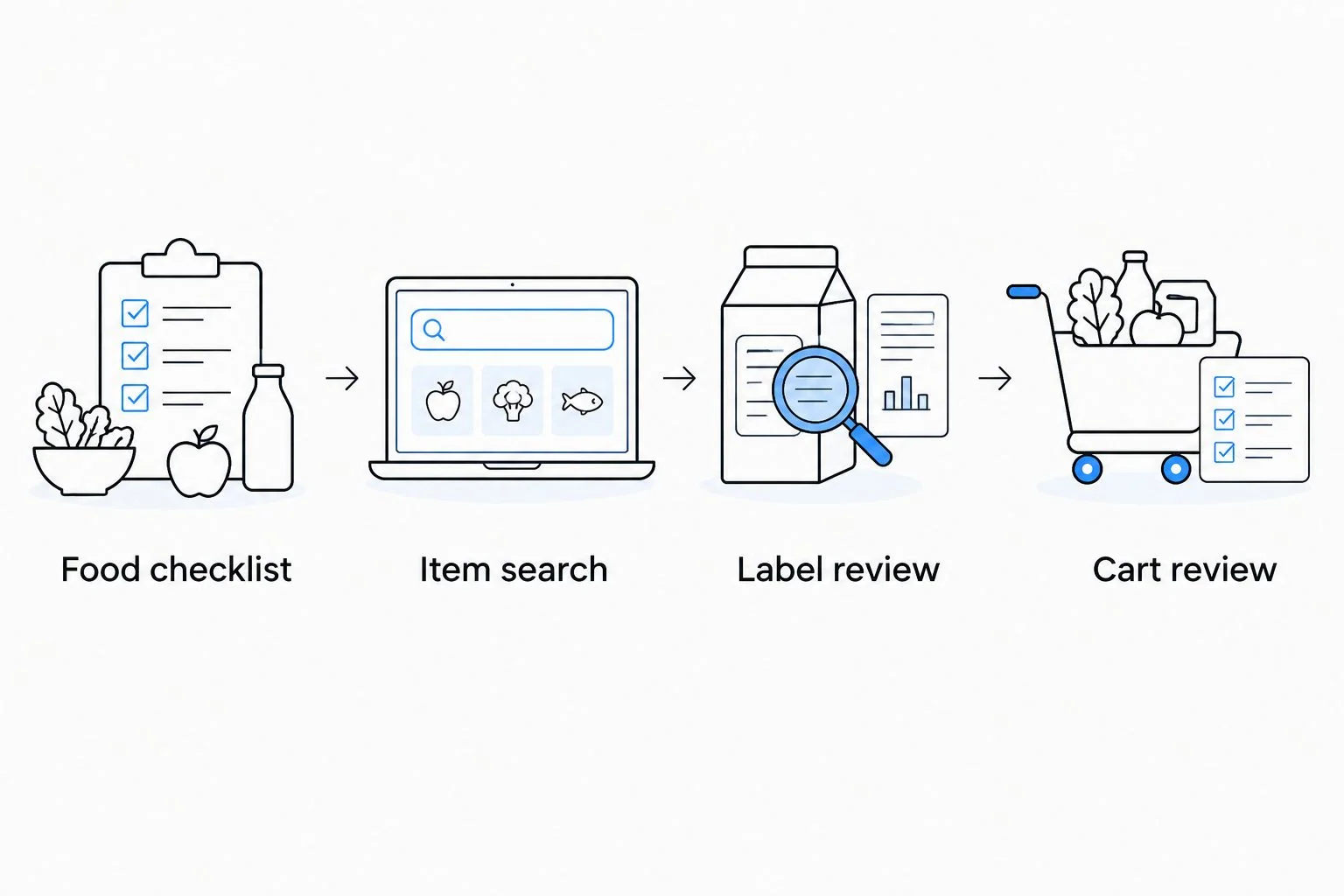
The transfer sequence stays simple: Food checklist, Item search, Label review, Cart review. Keep those checkpoints separate so a search result does not become a purchase without inspection.
Choose how to maintain the connection
These are two manual workflows, not two verified integrations. Choose based on whether you need a reusable planning record or simply want to finish the current order.
| Workflow | Best for | Advantage | Limitation |
|---|---|---|---|
| Checklist-first transfer | People planning meals or managing ingredient restrictions | Keeps food decisions separate from shopping | Requires updating both the checklist and cart |
| Cart-first review | People making a straightforward repeat grocery order | Lets you review purchases in one shopping session | Existing cart items can distract from the current meal plan |
Checklist-first transfer is the better starting point when treatment has changed what you eat. Cart-first review is simpler when your meals are already established, but a previous order is not evidence that the same quantities still fit.
Order review configuration
Substitution and quantity decisions belong before checkout. A product with a similar name can differ in ingredients, preparation, or package size.
Review replacements and checkout details
- Inspect every cart line. Compare it with your source list, paying particular attention to duplicates and package counts. Remove anything added while browsing that has no planned use.
- Review replacement preferences. Where Instacart presents replacement choices, select an acceptable alternative or decline a replacement for that item. Check ingredients rather than relying on similar packaging.
- Write food-specific instructions. Keep any shopper note about the product requirement, such as an ingredient exclusion. Do not put your medication dose or medical history in the note.
- Check the order summary. Confirm the address, fulfillment details, and final item quantities shown before placing the order. Ordering groceries does not transmit a nutrition plan to your clinician.
- Inspect delivered food. Check labels, package condition, and whether substitutions match your restrictions. Keep perishable food handling separate from the task of updating your checklist.
Expected result: You submit an order whose contents and replacement preferences reflect your current food plan, then verify the delivered groceries before using them.
For your 2026 routine, treat checkout as a review gate rather than a shortcut. Saved shopping habits are convenient, but your current needs determine what belongs in this order.
Repeat the workflow when your food plan changes
You do not need a new system every week. Repeat the same review whenever meals, tolerance, household needs, or clinician guidance change.
- Update the source checklist first. Remove meals you no longer intend to prepare and note food you already have.
- Review the cart against the revised list. Add new ingredients, remove obsolete ones, and adjust quantities manually. Do not assume that changing a note updates Instacart.
- Recheck replacements. An alternative that suited a previous meal is not automatically the right match for the next one.
- Close the loop after delivery. Record what arrived and what remains missing. If you track food intake, record what you actually eat—not the contents of a grocery order.
Expected result: The updated cart reflects your revised plan instead of carrying forward yesterday's assumptions.
If you want a separate food-recording routine, use the MyFitnessPal and GLP-1 weight-loss plan guide. Treat grocery ordering and intake tracking as different tasks unless you have verified a supported connection in the services you use.
Find out if GLP-1 treatment may be right for you.
Start My Pre-AssessmentTroubleshooting
My checklist edits did not change the cart
This manual workflow does not synchronize edits. Compare the current checklist with the cart, make the changes yourself, and mark the transfer complete only after both match.
Keep one source checklist rather than maintaining several competing copies. That reduces uncertainty about which version you intended to shop from.
The search result looks right but the package is wrong
Open the item details and compare package size, preparation, and ingredients. Correct the item or quantity before checkout; a similar product name does not establish an equivalent purchase.
If a restriction matters medically, verify the delivered label as well. Contact the retailer or Instacart support about an incorrect order item rather than treating it as interchangeable.
A replacement does not meet my dietary restriction
Review the order's replacement controls and choose an acceptable alternative or decline the replacement where those controls are offered. Keep the instruction specific to the food requirement.
For a serious food allergy, follow your allergy-management plan. A shopper note does not replace label review or advice about cross-contact.
My repeat order contains more food than I can use
Remove items already at home and recalculate purchases from planned meals. Review package sizes before reducing the variety of foods you buy.
A 1-week planning window is an optional organizing choice, not a requirement. Shorten your planning window when that better matches your household and ability to prepare food.
Nausea makes the planned meals difficult to eat
Revise the food plan around your clinician's advice rather than forcing the original cart. Do not change your medication dose to fit your grocery schedule.
Persistent vomiting, inability to keep fluids down, or severe abdominal pain needs prompt medical attention. Grocery planning is not treatment for a medication complication.
Customize your workflow
For 2026, make the system more useful by improving the source list—not by adding unverified automation. Add preparation notes, identify ingredients shared across meals, and separate household staples from foods tied to a specific recipe.
You can also keep a private note about foods you tolerate and questions for your clinician. Do not interpret that record as proof that a medication dose should change.
VEVArx's GLP-1 telehealth services address medical weight-loss care; this guide does not establish an Instacart partnership, shared account, or automatic exchange of health information. Keep clinical decisions with your care team and shopping decisions in your grocery workflow.
Have questions about your options? Start with a quick online assessment.
Start My Pre-AssessmentFAQ
Can I connect Instacart directly to my GLP-1 prescription account?
This guide does not establish a direct connection between Instacart and a GLP-1 prescription account. Use the manual checklist-to-cart workflow unless your services explicitly document a supported integration.
What's the best way to build a GLP-1-friendly Instacart grocery list?
Start with meals and food requirements that fit your clinician's guidance, then match each ingredient to an Instacart item. Review quantities, ingredients, and replacements before ordering.
Does VEVArx automatically send a grocery list to Instacart?
An automatic VEVArx-to-Instacart grocery-list feature is not established here. Keep your medical care and grocery ordering separate, and manually review any list you transfer.
Do I need special foods while taking a GLP-1 medication?
A GLP-1 medication does not create one universal grocery list. Your food choices should reflect your nutritional needs, dietary restrictions, symptoms, and clinician's recommendations.
Will changing my meal plan update my Instacart cart?
Changing your meal plan does not update the cart in this manual workflow. Transfer the changes yourself and check quantities and replacement preferences again.
Should I put my semaglutide or tirzepatide dose in shopper notes?
No—keep medication details out of shopper notes. Describe only the food requirement needed to select an appropriate item, and discuss medication questions with your clinician.
Is this Instacart grocery workflow still manual in 2026?
Yes, the workflow described in this 2026 guide is manual. It relies on a source checklist, individual item selection, and a final cart review rather than an assumed synchronization feature.
One last thing
A grocery order records what you bought, not what you ate. Keep that distinction when reviewing your nutrition: leftovers, shared meals, substitutions, and uneaten food all separate the cart from actual intake.
The most useful final check is simple: can you name a realistic use for every perishable item? If not, revise the cart before ordering.
Related guides
Ready to get started?
See if doctor-prescribed GLP-1 treatment may be right for you. It only takes a few minutes, 100% online.
Start My Pre-AssessmentThis article is for informational purposes only and is not medical advice. Compounded medications are not approved by the FDA and have not been reviewed for safety, effectiveness, or quality. Prescription products require an online consultation with a licensed healthcare provider who will determine if a prescription is appropriate. Individual results vary.