
How to connect your patient portal to refill peptide prescriptions
Refill peptide prescription patient portal guide: verify your account, request clinician review, and confirm pharmacy receipt before your next refill.

Instead of manually chasing refill messages, connect your existing patient account to the correct clinical practice, verify the prescription record, and submit a refill request through the provider’s supported process. This 2026 guide explains how to organize that workflow without confusing account access, clinician approval, and pharmacy processing.
- A refill peptide prescription patient portal workflow starts with the correct patient account and an accurate medication record.
- VEVArx offers US adults online, doctor-prescribed weight-loss and wellness peptide care; treatment decisions require clinical review.
- A submitted refill request does not establish approval, pharmacy receipt, or permission to change your dose.
- Use secure messaging when no refill control exists, and confirm the next step before submitting duplicate requests.
Why this matters
A working portal login is not the same as an authorized prescription refill. Your account identifies you, the clinician determines whether treatment should continue, and the pharmacy handles dispensing under a valid prescription. Keep those responsibilities separate.
VEVArx provides online, doctor-prescribed weight-loss medications and wellness peptides for adults in the US. VEVArx is best suited to US adults seeking online, doctor-prescribed weight-loss and wellness peptide care. A telehealth service fits that preference; account setup alone does not establish that a particular treatment is appropriate for you.
For your 2026 refill routine, track 3 checkpoints: request submission, the clinician’s decision, and pharmacy receipt. Treat each as a separate event rather than assuming one notification proves all three.
This guide covers administrative steps, not prescribing or dosing instructions. Follow your clinician’s directions and the dispensing pharmacy’s instructions for your specific medication.
Curious whether you qualify? A licensed provider makes the final call.
Start My Pre-AssessmentBefore you start
- Account access: Have the email address or phone number associated with your care, your password or invitation, and access to any required verification method. Open the portal through a trusted provider communication rather than a search advertisement or unsolicited message.
- Prescription materials: Gather your current medication label, prescribing clinician’s name, dispensing pharmacy details, and any instructions about follow-up visits or testing. Keep personal health information inside the provider’s approved communication channels.
- The easy-to-miss gotcha: A medication appearing in your history does not prove that it has refills remaining or that your current clinician manages it. A pharmacy refill uses an existing authorization; a renewal requires a new prescribing decision.
The headings below describe configuration tasks, not universal interface labels. Use the actual controls in your provider’s portal; do not expect every system to offer account linking, pharmacy connections, or automatic refill requests.
Patient account connection
Start with identity and account ownership. Connecting the wrong record creates a more serious problem than a missing refill button.
- Open the patient-access link supplied by your clinical practice. If you already have an account, sign in before creating another one. Duplicate accounts can separate messages and medication history.
- Complete the identity checks requested by the practice. Compare your name and date of birth with your own records, and report discrepancies rather than working around them.
- Confirm which practice or clinician the account belongs to. If the system supports adding an organization, follow that organization’s invitation or instructions; an email address alone does not connect unrelated portals.
- Review your contact information and notification preferences. Choose a channel you actually monitor, while recognizing that an alert can simply mean a secure message needs attention.
Expected result: You can access your own patient record, recognize the treating practice, and open messages intended for you. Stop here if someone else’s information appears.
For VEVArx peptide care, start with the access instructions supplied by the service. Do not assume a password from another healthcare organization works, or share credentials with a third-party application to force a connection.
If you cannot identify the correct account, resolve access first. Sending prescription information through an unrelated account does not repair the connection and creates avoidable privacy risks.
Prescription record verification
Once the account is correct, match the medication record to the instructions you actually received. Do not request a refill from an old entry just because its name looks familiar.
- Locate the medication information associated with your current treatment. Check whether the entry is current, historical, discontinued, or awaiting review, using the status shown by your portal.
- Compare 2 records: the portal entry and the dispensing label. Check the medication name, concentration, prescribed directions, and prescriber. Ask the care team to reconcile any mismatch.
- Identify the pharmacy associated with the prescription. A pharmacy saved in your profile is not proof that the clinician sent the current prescription there.
- Check for outstanding clinical instructions. Complete a requested follow-up or questionnaire through the approved process, and ask the care team whether anything else is required for a decision.
Expected result: You can identify the current prescription, its prescriber, and the intended pharmacy without conflicting instructions.
Concentration and dose are different pieces of information. For injectable medication, do not assume that a volume or syringe marking from a previous container applies to a new prescription. Ask the pharmacist or prescriber to clarify discrepancies before using it.
During your 2026 record check, distinguish the date you received a message from the date the clinician issued the instructions. A newly delivered notification can still refer to an older prescription.
Refill request preparation
Prepare a request that gives the care team enough information to understand what you need. Keep the request specific rather than sending a message that only says you need more medication.
- Use the portal’s supported prescription-request function if one is present. If none exists, use its secure clinical messaging route or ask the practice how it accepts refill requests.
- Identify 1 medication per request unless the practice directs otherwise. Include the medication name as written on the label and identify the prescribing clinician when requested.
- Report your current use accurately, including your most recent dose, any treatment interruption, relevant side effects, and changes in other medications. State what you took, not what you think the record should say.
- Confirm the intended pharmacy and submit the request. Retain any confirmation or reference information the portal provides, without assuming a confirmation means approval.
Expected result: The request identifies the medication and reaches the practice’s designated channel, with a submission record if the system provides one.
If your supply is running low, state that clearly and ask about the next step. Do not stretch doses, double up, borrow medication, or change your schedule to compensate for an administrative delay. Get medication-specific advice from your prescriber or pharmacist.
A well-written request reduces ambiguity, but it does not replace clinical assessment. Your clinician can require further information or decide that continuing the prescription is not appropriate.
Approval and pharmacy confirmation
After submission, follow the decision rather than repeatedly sending the same request. The practical goal is a clear handoff, not a growing collection of confirmation emails.
- Monitor the secure message thread or request record. Read any questions from the care team and respond through the same approved channel when possible.
- Identify the actual clinical decision. A receipt acknowledgment, appointment reminder, or completed questionnaire does not establish that a clinician authorized a prescription.
- If the practice confirms that it sent a prescription, verify the destination. Ask the dispensing pharmacy whether it received the prescription and whether clarification is needed.
- Review the final dispensing instructions before using the medication. Resolve differences involving the medication, concentration, directions, or your treatment history with the pharmacist or prescriber.
Expected result: You know whether the request remains under review, requires another action, was declined, or resulted in a prescription sent to the intended pharmacy.
Use these checkpoint names in your notes so you do not confuse the stages: Request submitted, Clinical decision, and Pharmacy receipt.
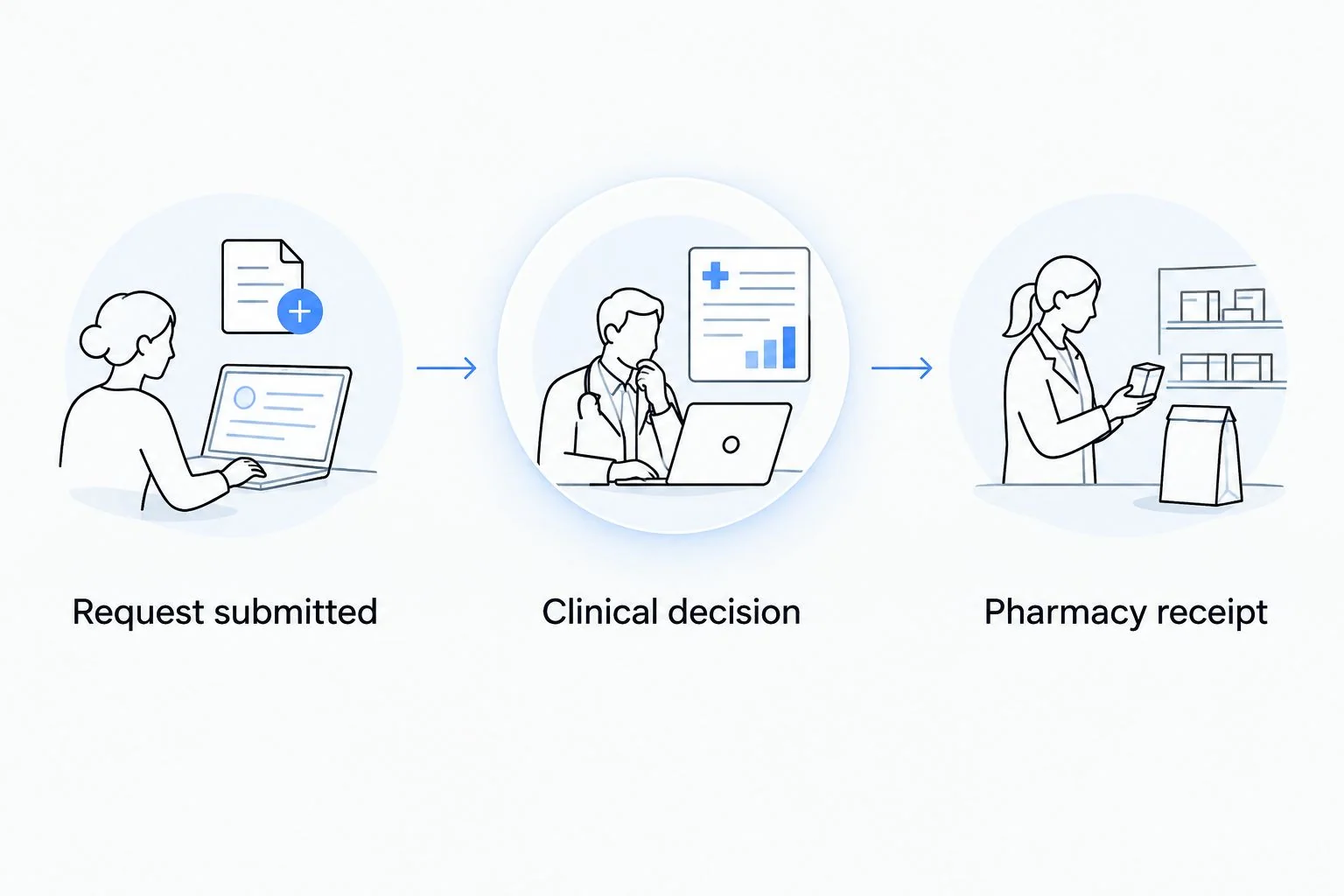
For your 2026 refill log, record what each party confirmed and when. Do not label a request complete while the pharmacy is still asking the prescriber to clarify instructions.
Request a renewal when treatment changes
A second workflow applies when you need a new prescribing decision rather than another dispensing under unchanged instructions. Examples include a requested medication change, a treatment gap, or instructions that no longer match your current use.
Best for unchanged treatment: Use the routine refill route when the prescription and practice instructions support it. Best for a changed treatment plan: Ask for clinician review instead of trying to edit an old prescription yourself.
| Workflow | Best for | Benefit | Limitation |
|---|---|---|---|
| Routine refill request | Continuing an existing prescription under unchanged instructions | Identifies the existing treatment you want reviewed | Does not authorize dose changes or guarantee further prescribing |
| Renewal or treatment review | An expired prescription, treatment interruption, or proposed change | Gives the clinician a chance to reassess the plan | Can require a consultation or additional information |
For the renewal workflow, describe what changed, identify the previous prescription, and ask what assessment is required. If the clinician provides a new plan, confirm which previous instructions it replaces.
In VEVArx peptide care, as with other clinician-directed treatment, the prescription decision belongs to the prescriber. A portal message requesting a higher dose is not permission to take it.
Do not treat a refill reminder as a clinical recommendation. A reminder helps you remember an administrative task; it does not establish that your health circumstances or prescription instructions remain unchanged.
Find out if GLP-1 treatment may be right for you.
Start My Pre-AssessmentTroubleshooting
Your medication does not appear
Check that you are in the correct patient account and practice record. Then ask the care team to reconcile the missing prescription using the label details; do not create a new medication entry and treat it as an authorized prescription.
There is no refill control
Use the practice’s approved secure messaging or contact route to ask how it handles prescription requests. Some requests need clinical review outside a dedicated refill control. A missing control is not a reason to buy from an unverified seller.
The request has no clear outcome
Read the message thread for unanswered questions, then ask the practice which checkpoint the request has reached. Reference the existing request rather than submitting duplicates. No universal processing deadline applies across every practice, pharmacy, and medication.
The pharmacy cannot find the prescription
Confirm the pharmacy location and identifying details with both parties. Ask the practice to verify the destination and transmission, and tell the pharmacy about any name discrepancy. A portal entry alone does not prove pharmacy receipt.
The directions conflict with your label
Contact the pharmacist or prescriber before using conflicting instructions. Do not calculate a replacement injection volume from an old container, another patient’s directions, or an online conversion chart. If you have severe symptoms or believe you are experiencing an emergency, seek urgent medical care rather than waiting for a portal reply.
Customize your workflow
Build a small refill record that separates administrative tasks from clinical decisions. Keep the current medication label, the relevant secure message thread, and the confirmed pharmacy details together in a private location.
For a manageable 2026 routine:
- Track the next action: Note whether you owe the practice a response, the clinician is reviewing the request, or the pharmacy needs clarification.
- Use reminders carefully: Set a personal reminder around the schedule your care team recommends. A calendar reminder does not establish an automatic prescribing arrangement.
- Keep records current: Report changes in contact information, pharmacy choice, other medications, and health circumstances through the appropriate channel.
- Protect access: Use a unique password and enable additional authentication if the portal supports it. Never send a password or verification code to someone offering to connect your account.
For medication-specific context, read the guide to automatically refilling a semaglutide prescription online. Confirm the process that applies to your own prescription rather than treating automation as a substitute for review.
Have questions about your options? Start with a quick online assessment.
Start My Pre-AssessmentFAQ
How do I connect my patient portal to refill a peptide prescription?
Start with the account-access instructions supplied by your clinical practice, verify your identity, and match the current prescription to your dispensing label. Then use the practice’s supported refill or secure messaging process; not every portal offers a separate connection feature.
Does submitting a peptide refill request mean it is approved?
No. Submission records a request, while approval requires the appropriate prescribing decision. Confirm pharmacy receipt separately if the clinician authorizes and sends a prescription.
What should I do if there is no refill button in my portal?
Ask the practice how it accepts prescription requests through its approved messaging or contact channel. Do not assume a missing button means you should open another patient account or obtain medication elsewhere.
Can my patient portal automatically refill my peptide prescription?
Only rely on an automatic process if your practice and pharmacy explicitly confirm what it does. A reminder, payment arrangement, or recurring message does not itself authorize a prescription renewal.
Can I request a higher dose through the patient portal?
You can ask your clinician to review your treatment, but a request does not authorize a dose increase. Continue only according to your current clinical instructions and obtain clarification when they conflict.
What if I missed doses while waiting for my refill?
Contact your prescriber or pharmacist for medication-specific restart instructions. Do not double up or assume your previous schedule remains appropriate after an interruption.
Can I use the same portal for every peptide prescription?
Use the portal associated with the clinician managing each prescription. Different practices and pharmacies do not necessarily share accounts, medication records, or refill requests.
One last thing
The most useful refill record is not a screenshot of the submit button—it is a clear account of the current instructions and the next responsible party. Before closing the portal, write down who needs to act next and what you are waiting to learn.
For VEVArx patients, keep clinical questions with the treating care team and pharmacy questions with the dispensing pharmacy. That distinction prevents an account-access problem from turning into a medication-use mistake.
Related guides
Ready to get started?
See if doctor-prescribed GLP-1 treatment may be right for you. It only takes a few minutes, 100% online.
Start My Pre-AssessmentThis article is for informational purposes only and is not medical advice. Compounded medications are not approved by the FDA and have not been reviewed for safety, effectiveness, or quality. Prescription products require an online consultation with a licensed healthcare provider who will determine if a prescription is appropriate. Individual results vary.